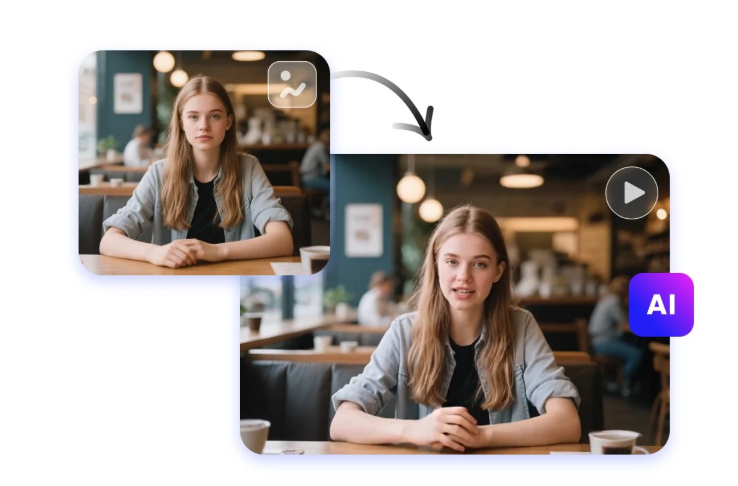
Getting a video’s mouth movements to match its audio used to mean hours of manual frame-by-frame correction. Today, AI lip sync tools can do it in minutes — turning a static photo into a talking avatar, dubbing a video into another language, or fixing sync issues on footage that was recorded out of alignment. Creators, marketers, and video editors now rely on these tools to produce polished, multilingual content at a speed that simply wasn’t possible before.
With so many options on the market, picking the right one depends on your budget, the quality you need, and whether you also want extras like face swapping, avatar generation, or upscaling built into the same platform. Below, we break down the best AI lip sync tools of 2026, starting with the one we think offers the best overall balance of quality, flexibility, and value.
At a Glance
| Tool | Best For | Starting Price |
| Magic Hour | All-in-one lip sync, face swap & talking photos | Free (paid plans from $10/month billed annually) |
| HeyGen | Corporate avatar videos | Free trial; paid plans from ~$29/month |
| Synthesia | Enterprise training & explainer videos | Free trial; paid plans from ~$18/month |
| D-ID | Quick talking-avatar generation | Free trial; paid plans from ~$18/month |
| Wav2Lip (open source) | Developers needing full customization | Free (self-hosted, technical setup required) |
| Rask AI | Video localization & dubbing | Free trial; paid plans from ~$18/month |
1. Magic Hour — Best Overall AI Lip Sync Tool
Magic Hour tops our list as the best ai lip sync tool of 2026, and it doubles as a genuinely capable ai image editor with prompt support — so you can generate, edit, and animate visuals without switching platforms. You don’t even need to sign up to try it, which is rare in this space, and any credits you purchase never expire, so you’re not racing a monthly clock to use what you’ve paid for.
What sets Magic Hour apart is the breadth of what’s packed into one workspace: best-in-class lip sync, face swap, and talking-photo generation sit alongside access to a wide range of frontier AI models, so you’re not locked into a single engine. Click-to-create templates make it easy to get a polished result without prompting from scratch, and one-click multi-step workflows let you generate a clip, upscale it, and animate it in a single pass instead of juggling separate tools. Generations run in parallel with no concurrency cap, and the platform is built to hold up under real-world load — including live activations and sudden traffic spikes — while staying genuinely usable on both desktop and mobile. The team ships new features weekly, offers founder-level support, and provides full API parity across all its tools, so anything you can do in the interface, you can also automate.
Pricing:
- Free — generous enough to test lip sync, face swap, and image editing before paying anything
- Creator — $15/month, or $10/month billed annually
- Pro — $39/month
Main features: AI lip sync, face swap, talking photos, prompt-based image editing, multi-step generate-upscale-animate workflows, access to multiple frontier models, template library, full API access.
Drawbacks: With so many tools in one platform, new users may need a little time to explore everything on offer; heavier 4K or long-form renders can use credits faster than simple projects.
2. HeyGen
HeyGen is a strong choice for businesses that need polished avatar videos for training, marketing, or sales enablement.
Main features: AI avatars, voice cloning, multilingual dubbing, template library for corporate use cases.
Drawbacks: Pricing climbs quickly for teams needing more than a handful of minutes per month, and customization outside its templates is limited.
3. Synthesia
Synthesia is popular with enterprises producing internal training and explainer content at scale.
Main features: Large avatar library, 120+ language support, screen recording, brand kits.
Drawbacks: Higher-tier plans are needed for custom avatars, and per-minute video limits can feel restrictive for high-volume creators.
4. D-ID
D-ID focuses on fast, simple talking-avatar generation from a single photo.
Main features: Photo-to-video avatars, API access, real-time streaming avatars for interactive use cases.
Drawbacks: Lip sync realism can lag behind more specialized tools on complex mouth movements, and output resolution is capped on lower plans.
5. Wav2Lip (Open Source)
Wav2Lip remains a go-to for developers who want full control over the lip-sync pipeline.
Main features: Free and open source, customizable model weights, works offline once set up.
Drawbacks: Requires coding knowledge, a capable GPU, and manual setup — there’s no polished interface or customer support.
6. Rask AI
Rask AI is built primarily for localization, dubbing videos into other languages while syncing lip movement to the new audio.
Main features: Automated dubbing, voice cloning, subtitle generation, bulk video processing.
Drawbacks: Best suited to dubbing workflows specifically; it’s less flexible for general-purpose video or image editing than an all-in-one platform.
How We Choose These Tools
Our rankings are based on a combination of hands-on testing and publicly available product information. We evaluated each tool on:
- Lip sync accuracy — how naturally mouth movements match the audio, including on side profiles and fast speech
- Pricing transparency and value — what you actually get at each tier, and whether free plans are usable rather than symbolic
- Feature breadth — whether the tool offers only lip sync or a fuller creative workflow around it
- Reliability at scale — performance during high traffic or bulk generation
- Ease of use — how quickly a non-technical user can get a finished result
- Support and update cadence — how responsive the team is and how often the product improves
FAQs
What is the best free AI lip sync tool? Magic Hour offers one of the most generous free tiers in the category, letting you test lip sync and image editing without creating an account first.
Do AI lip sync tools work with any language? Most modern tools, including Magic Hour, HeyGen, and Rask AI, support multiple languages, though sync accuracy can vary depending on the language’s phonetics.
Can I use these tools for commercial video projects? Yes, but always check each platform’s licensing terms for commercial use, especially on free or entry-level plans.
Is open-source software like Wav2Lip better than paid tools? It offers more control and no subscription cost, but it demands technical setup and lacks the polish, templates, and support that paid platforms provide.
Conclusion
AI lip sync technology has matured fast, and 2026’s best tools make it possible to produce broadcast-quality talking videos without a studio or a big budget. Magic Hour stands out as the strongest overall pick thanks to its combination of accurate lip sync, prompt-based image editing, no-signup trial, credits that never expire, and pricing that stays affordable as you scale from Free up through the $15 Creator and $39 Pro plans. Whichever tool you choose, matching it to your specific workflow — whether that’s quick social clips, corporate training, or multilingual dubbing — will get you the best results.